Create Product Demos
& Training Videos in Minutes.
Upload your raw screen capture and let VideoMule write the script, generate a professional voiceover, and sync it to your video automatically.


Trusted by teams at




Real video docs made with VideoMule
Every one of these was scripted, voiced, and rendered by VideoMule - no manual editing.

VideoMule Demo

Tutorial Video

Product Explanation Video

Educational Lesson

SaaS Walkthrough

Features Learning

Course Video
VideoMule Demo
Tutorial Video
Product Explanation Video
Educational Lesson
SaaS Walkthrough
Features Learning
Course Video
Five steps to your video
From raw screen capture to polished tutorial in minutes, not hours.
Step 1: Screen record or Upload your Screen
See how uploading works
Everything you need to create tutorials
A complete toolkit for turning screen recordings into polished, narrated tutorial videos.
AI Avatar Integration
Use AI avatars to present your content, explain steps, or guide viewers without recording yourself.

Zoom & Focus Animations
Automatically add zoom-ins and motion effects to highlight important actions in your recording and guide viewer attention clearly.

Add Callouts & On-Screen Text
Explain steps visually with text overlays, annotations, and callouts that make your videos easier to follow.

Translate Videos to Any Language
Turn one video into multiple versions with AI-generated voice and captions across different languages.

Record or Upload Instantly
Record your screen instantly with browser-based recording, screen selection, and quick preview.

Built-in Animation Effects
Apply smooth transitions and animation styles to make your videos feel polished and professional.

Add Your Own Custom Voice
Connect your ElevenLabs account to clone and import your own voice, then narrate every video in a voice that is unmistakably yours.

Free Unlimited Local Renders
Render your final video right in your browser — free, unlimited, up to 4K, and it never uses your monthly render quota on paid plans.

Put a presenter in your video — even you.
Train an AI clone from 15 seconds of footage, or pick a stock presenter. The avatar delivers your intro, outro, and transitions while your screen recording stays the star.
Normal, Standard, High
Three quality tiers, all rendered at 1080p — pick fidelity per video and pay 1×, 3×, or 4× avatar minutes.
3, 8, or 20 avatar minutes
Included every month on Creator, Team, and Agency — top up anytime with credit packs.
1, 3, or 10 avatar slots
Each slot is one person, with up to 10 looks. Avatars unlock when your paid plan starts.


Inside the VideoMule Editor
A professional timeline editor built for tutorial creators — trim, narrate, caption, and export with ease.
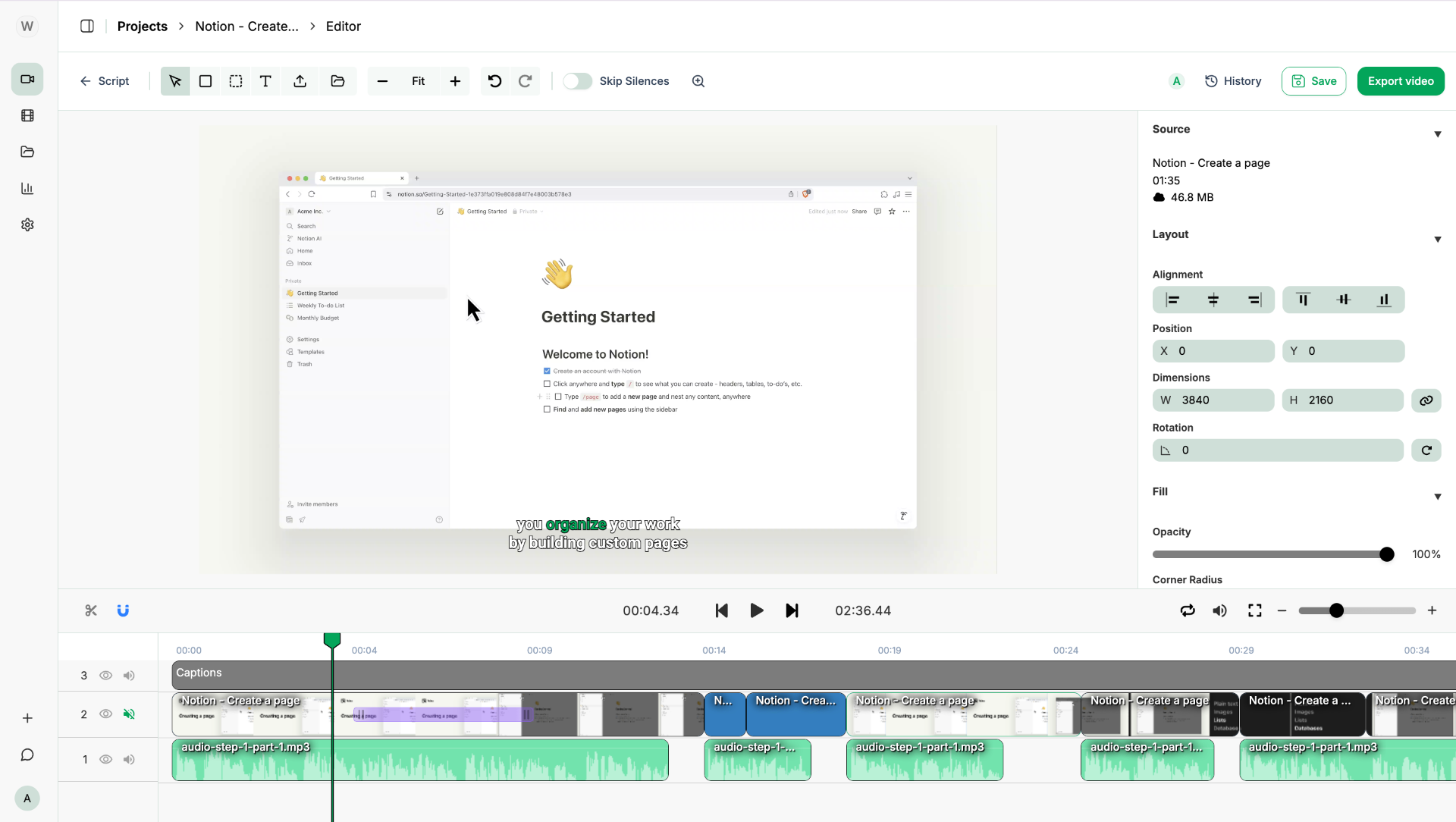
Multi-track Timeline
Video, audio & caption layers
Auto Zoom-ins & Callouts
Highlight key actions and guide viewer attention
Voice Sync
AI narration aligned to your screen
One-click Export
HD video ready to publish
Before vs After VideoMule
Why struggle with traditional methods when you can automate the entire process? See the impact VideoMule creates.
No Audio Explanation
Your screen recording has no narration to explain the steps.
Low Engagement
Viewers quickly lose interest without clear guidance.
Manual Script & Voiceover
You must write scripts and record voiceovers separately.
Slow Production Workflow
Recording, editing, and adding voiceover can take hours.
Automatic Voiceover & Sync
AI generates a script and perfectly narrates every step.
Higher Viewer Engagement
Professional narration keeps viewers watching.
Ready in Minutes
VideoMule turns your recording into a tutorial video instantly.
All-in-One Workflow
Script generation, voiceover, captions, and editing in one place.
Built for Every Team
No matter your role, VideoMule adapts to your workflow.

3x
Faster onboarding
SaaS
Turn features into product demos
Record your product, and let AI generate polished demos, onboarding tours, and feature walkthroughs. Help prospects understand your product faster without a dedicated video team.
Simple & Transparent Plans For Creators
Choose the plan that fits your needs. Start using VideoMule today!
For solo creators who want studio-quality video
Perfect for solo creators who want high-quality voices, more uploads, and watermark-free videos.
Billed $228.00/yr · save $360.00/yr (61%)
$0 today — your plan starts Sep 3, 2026 at $228.00/yr unless you cancel. Cancel anytime. Card required to start.
Free trial includes 2 videos (3 min each), 10 mins of AI voice-over, 1 translation, and 1 watermarked export. Full plan limits unlock when your paid plan starts.
Usage / month
- 30 mins of video upload
- 40 mins of AI voice included
- 3 avatar credits (Normal 1 · Standard 3 · High 4 credits/min)
- 30 cloud renders
- Unlimited free local renders
- 15 translations
Limits & seats
- 15 mins max per video
- 10 GB storage
- Train up to 1 custom AI avatar (photo or digital twin)
- 1 user
For small teams producing video at volume, together
Ideal for small teams collaborating on video content with shared storage and up to 5 users.
Billed $588.00/yr · save $600.00/yr (51%)
$0 today — your plan starts Sep 3, 2026 at $588.00/yr unless you cancel. Cancel anytime. Card required to start.
Free trial includes 2 videos (3 min each), 10 mins of AI voice-over, 1 translation, and 1 watermarked export. Full plan limits unlock when your paid plan starts.
Usage / month
- 60 mins of video upload
- 80 mins of AI voice included
- 8 avatar credits (Normal 1 · Standard 3 · High 4 credits/min)
- 60 cloud renders
- Unlimited free local renders
- 30 translations
Limits & seats
- 18 mins max per video
- 20 GB storage
- Train up to 3 custom AI avatars (photo or digital twin)
- Up to 5 team members
For agencies delivering client video at scale
Built for agencies and enterprises with high-volume needs, longer videos, and up to 15 team members.
Billed $1,908.00/yr · save $480.00/yr (20%)
$0 today — your plan starts Sep 3, 2026 at $1,908.00/yr unless you cancel. Cancel anytime. Card required to start.
Free trial includes 2 videos (3 min each), 10 mins of AI voice-over, 1 translation, and 1 watermarked export. Full plan limits unlock when your paid plan starts.
Usage / month
- 120 mins of video upload
- 200 mins of AI voice included
- 20 avatar credits (Normal 1 · Standard 3 · High 4 credits/min)
- 120 cloud renders
- Unlimited free local renders
- 60 translations
Limits & seats
- 20 mins max per video
- 50 GB storage
- Train up to 10 custom AI avatars (photo or digital twin)
- Up to 15 team members
Why Choose VideoMule
VideoMule brings recording, AI generation, editing, and export into one workflow — so you can turn simple screen recordings into finished videos without stitching together multiple tools.
 Approach
From Recording to Finished Video
Start with a screen recording and turn it into a complete video with script, voiceover, captions, and final edits in one place.
AI That Understands Your Content
VideoMule analyzes what’s happening in your video and builds a structured script that matches your steps and screen flow.
Fast Editing Without Heavy Software
Trim clips, add zoom, adjust layouts, manage captions, and refine timing without learning complicated editing tools.
Create in Multiple Languages
Generate voiceovers and captions in multiple languages from the same recording, making it easy to localize content without re-recording.
Flexible Workflow for Any Team
Record from Chrome, upload existing videos, edit quickly in the editor, or go through the full AI dashboard workflow depending on your needs.
Built for Real Video Use Cases
Create tutorials, product demos, onboarding guides, educational videos, and training content with a workflow designed for actual production.
See What the Hype Is About
Real results achieved by real users with engaging AI-voiceover videos!

— Harish
Editor
After exploring the VideoMule AI Tool, I just wondered how it saves me a lot of time using raw video. It automatically generates a script which can be edited and generates realistic voiceover which syncs with the visuals. The quality of the output video is top-notch.

— Laxmi
Writer
VideoMule has become a go-to tool in my workflow. The built-in editor makes quick fixes super easy, and I really like that the video already comes with a voiceover. If a line feels off, I can change it instantly and regenerate the voice without any hassle.

— Aravind
Researcher
I have never seen an AI tool like this before. It reduced my manual work load to almost nothing. It turned my tutorial screen recording into a complete professional video in no time. So far, this tool has worked best for me.

— Taniya
Writer
Videomule has been a great addition to my scripting workflow! Tasks that use to take me hours, now are done in mere minutes. I especially love how I can edit the script lines right there in the tool, and within a click the voiceover is regenerated.
— Manasi
Writer
Recently, I started using Video Mule for my video scripts, it has made my work so much easier, by giving all the exact lines that perfectly match my visuals along with detailed information about the actions.

— Rupina
Writer
VideoMule made video creation very much easier. With just a raw recording, it creates a complete script, adds professional voiceovers, and syncs well with the visuals. It helps me save a lot of time and its definitely a must have tool.

Frequently Asked Questions
Got questions? We've got answers.
Ready to Create
Amazing AI Voiceover Videos?
Transform your screen recordings into professional videos with AI-powered voiceovers in just minutes.
